Employee Management System
PHP & MySQL Based HR & Payroll Platform
A full-cycle employee lifecycle platform unifying HR onboarding, real-time attendance tracking, salary sheet generation, project workflows, daily worksheets, and leave management into a single role-aware admin dashboard.
My Role
Lead UX Designer
User Roles
Admin & Employee
Platform Scope
Full HR ERP Suite
Core Principle
Role-Aware Clarity
The Core Challenge
Growing organisations typically manage HR through fragmented tools - spreadsheets for attendance, third-party payroll software, email-based leave requests, and isolated task boards with zero cross-system visibility.
This creates administrative overhead, payroll errors, attendance manipulation risks, and a complete absence of real-time project-to-productivity accountability for both management and employees.
The Unified Solution
We engineered a role-aware EMS platform connecting employee onboarding, daily attendance, salary computation, project task tracking, and HR workflows inside a single, coherent dashboard experience.
Salary sheets auto-generate from attendance data. Leave approvals trigger payroll deductions. Daily worksheets feed into project progress - all in real time without manual reconciliation.
End-to-End System Workflow
Mapping how Admin and Employee roles interact across the full HR lifecycle - from login to payroll generation.
User Login
Secure credential-based authentication detects role on login — Admin or Employee — routing each to their respective dashboard view.
Profile Management
Users manage personal details, emergency contacts, bank info, and avatar. Admins can view and edit any employee profile from the directory.
Role Assignment
Admin assigns granular roles and permission sets — defining which modules and actions each user can access across the entire platform.
Dashboard Access
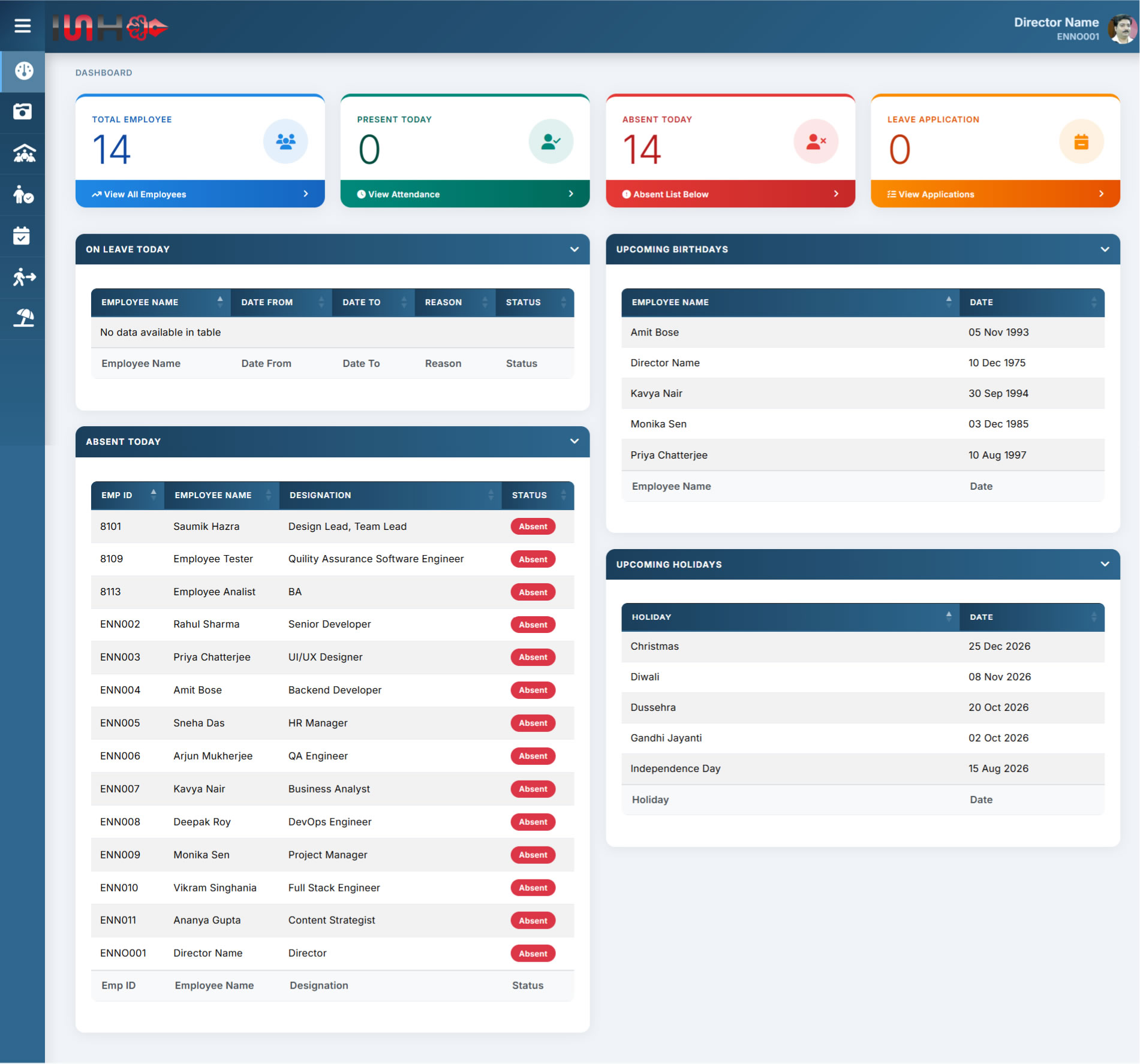
Admin sees org-wide stats: total employees, present today, absent today, leave applications, upcoming birthdays, and holidays at a glance.
Employee Management
Admin adds, edits, and manages employee records — department, designation, joining date, employee ID, and documents in the employee master.
View Attendance
Admin monitors daily attendance with Emp ID, name, designation, and status. Dashboard highlights absent employees and those on approved leave.
Leave Application
Employee submits leave with type, date range, and reason. Admin reviews the queue — approval updates attendance and triggers salary deduction.
Holiday Master
Admin configures the annual holiday calendar (Christmas, Diwali, Dussehra etc.). Public holidays auto-display on dashboards and are excluded from payroll.
Salary Management
Admin defines base salary, allowances (HRA, TA, DA), PF, and TDS deductions per employee. Structures update without affecting historical payroll records.
Auto Computation
Month-end payroll auto-computes — factoring attendance, approved leaves, public holidays, and deductions to calculate accurate net pay per employee.
Salary Sheet Generation
Printable, downloadable salary slips generated per employee. Admin gets the full payroll sheet; employees access only their own salary history.
Project Master
Admin creates projects, assigns team members, sets deadlines. Tracks completion percentage and workload across the organisation.
Daily Worksheet
Employees log daily tasks against assigned projects — hours worked, task description, and progress status. Feeds into project health dashboards.
Admin Review
Admin reviews daily worksheet submissions across teams, approves work logs, and uses productivity data for appraisals and project reporting.
Birthday Notifications
Admin dashboard highlights upcoming employee birthdays with name and date — fostering a people-first culture through automated awareness alerts.
Architectural UX Win: Attendance-Driven Payroll Automation
Eliminated month-end manual reconciliation entirely. Attendance records, approved leave data, and the holiday master automatically feed salary computations — generating accurate pay slips in a single click with zero data re-entry.
Role-Based Access Control (RBAC)
Tailored interfaces for two primary user personas — each with distinct access boundaries and workflow capabilities.
1. Admin (Director / HR Manager)
Full organisational control — manages employees, approves leave requests, configures salary structures, oversees projects, generates payroll sheets, and sets access permissions for all platform users.
2. Employee (Staff Member)
Personal self-service portal — views own attendance, submits leave applications, accesses salary slips, updates personal profile, and logs daily work against assigned projects.
Complete Feature Coverage
Mapping all 13 core modules across Admin control surfaces and Employee self-service touchpoints.
Admin Control Panel
Admin View- Secure User Login & Session Authentication
- Manage User Roles & Permissions (RBAC)
- Admin Dashboard with Stats, Birthdays & Holidays
- Employee Master Directory & Profile Management
- View Attendance — Daily, Monthly, Override
- Leave Application Review & Approval Workflow
- Holiday Master Calendar Configuration
- Salary Structure Setup & Management
- Automated Salary Sheet & Payroll Generation
- Project Master — Create, Assign & Track
- Daily Worksheet Review & Log Approval
- Birthday Notification Dashboard Widget
Employee Self-Service Portal
Employee View- Secure Login & Password Management
- Personal Profile Management & Updates
- Employee Dashboard — Personal Activity Feed
- Daily Attendance View & Monthly History
- Leave Application Submission & Status Tracking
- Holiday Calendar View
- Salary Slip Access & Download
- Assigned Project Overview
- Daily Worksheet Submission Against Projects
- Team Birthday Notifications
Feature Module Breakdown
Every functional module designed with dedicated UX flows and interaction patterns.
Authentication
Secure login, session handling, and password recovery flows.
User Profile
Personal info, bank details, emergency contacts, avatar upload.
User Role
Granular RBAC — assign, modify, and restrict access per user group.
Dashboard
Admin org analytics & employee personal activity summary boards.
Salary Management
Configure CTC, allowances, and deductions per employee or grade.
Salary Sheet
Auto-generated downloadable monthly salary slips and full payroll reports.
Employee Mgmt
Full employee lifecycle — hire, department mapping, transfer, archive.
Manage Attendance
Daily check-in/out log, admin override, and monthly attendance registers.
Project Management
Create projects, assign teams, and track milestones and completion status.
Daily Worksheet
Employee task log tied to projects — hours, description, progress status.
Leave Application
Apply, review, and approve leaves — auto-linked to salary & attendance.
Holiday Management
Yearly holiday calendar — auto-excluded from payroll & attendance counts.
Birthday Notification
Automated birthday alerts with employee name and date on admin dashboard.